Light Loading Start in ACPF simulations
In power system load-flow ACPF simulations, the term "light loading start" refers to a specific initialization strategy or starting condition used when solving the nonlinear power flow equations. A light loading start means that the system is initialized under light (reduced) load conditions, typically close to no-load operation, to help the power flow algorithm converge.
SAInt has its own strategy to speed up calculations and facilitate convergence. The parameters to activate and fine-tune SAInt’s light loading start methodology are available as part of the properties of a steady state or quasi-dynamic ACPF scenario.
1. Open the Scenario Property Editor
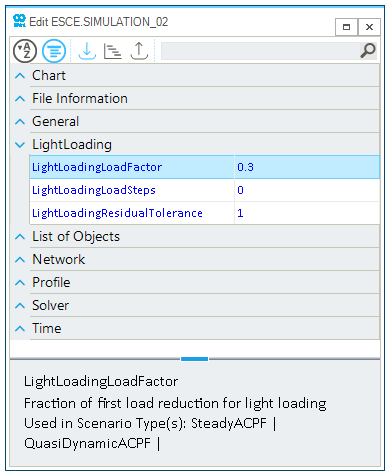
Once a steady state or quasi-dynamic ACPF scenario is created and active, open the scenario Property Editor by either to button ESCE in the "Scenario" tab, or from the context menu after selecting the scenario under the entry "Scenario Files" in the Project Explorer. In the Property Editor, scroll to the section "LightLoading" to access all relevant properties, as in Figure 1.
2. Set Light Loading Start parameters
From the scenario Property Editor, it is possible to change the light loading start parameters:
LightLoadingLoadFactor-
The parameter defines the load reduction for all demand and shunt active and reactive power loadings during the first load reduction step. The default value is set to 0.3 (i.e., 30 % of the initial load). The validity range is between zero and one. Smaller values will reduce the loadings and facilitate the start-up of the system. Bigger values will make the initial conditions more like the full load case and may require more time and iterations for the solver to be able to find a solution.
LightLoadingLoadSteps-
The parameter defines the number of steps in the methodology bringing the system from the initial light loading level to the full loading level. The default value is zero, which means that the light loading start procedure is not active. Valid values are integers in [1;20]. The more steps, the smoother the process is at a cost of more computations. The step is defined based on the ratio (1-
LightLoadingLoadFactor)/LightLoadingLoadSteps. LightLoadingResidualTolerance-
During the light loading start phase, the solver is using a different residual tolerance to be able to speed up the search of a solution and reduce the number of iterations. This parameter defines the tolerance used by the solver during the light loading start. The default value is 1 against the default normal solver tolerance of 0.00001 (from the general settings). Valid values are in the range [10-5;104].